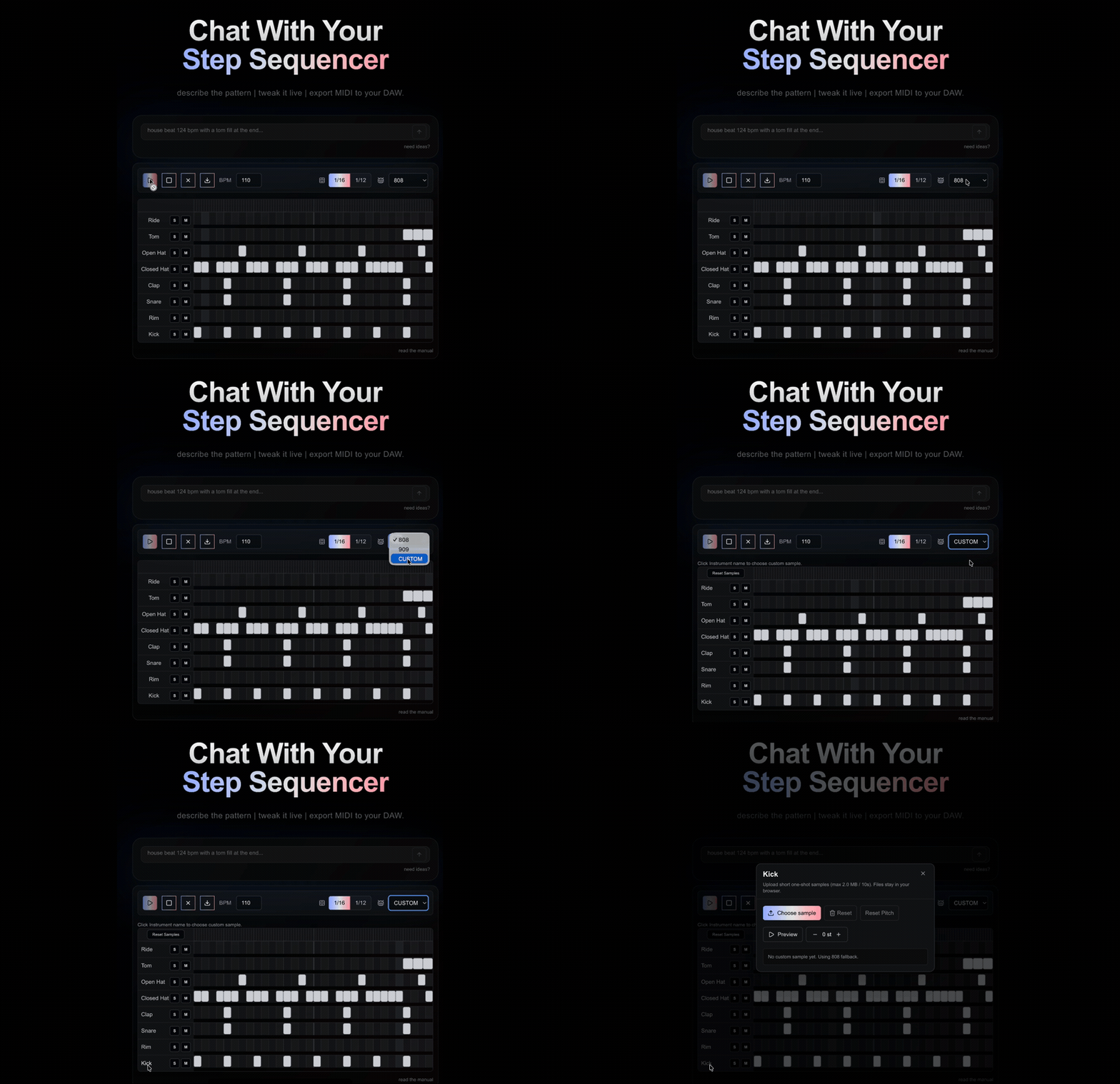
Project Overview
bootsncats is a step sequencer you build by describing the beat.
Programming a drum pattern by hand means clicking out every hit on a grid, which is fine once you know what you want and slow when you don't. Most of the time you can say the thing — "house beat at 124 with a tom fill at the end," "make the hats more swung," "add a clap on the backbeat" — long before you'd finish clicking it in. So you type that, and the pattern shows up on the grid.
From there it's a normal sequencer. You play it back, toggle steps, change the tempo, solo a lane to hear it on its own. When it's right, you export — MIDI to drop into a DAW, a full mix to share, or separate stems to mix. It runs in the browser, there's no account, and custom samples are decoded and played locally instead of uploaded.
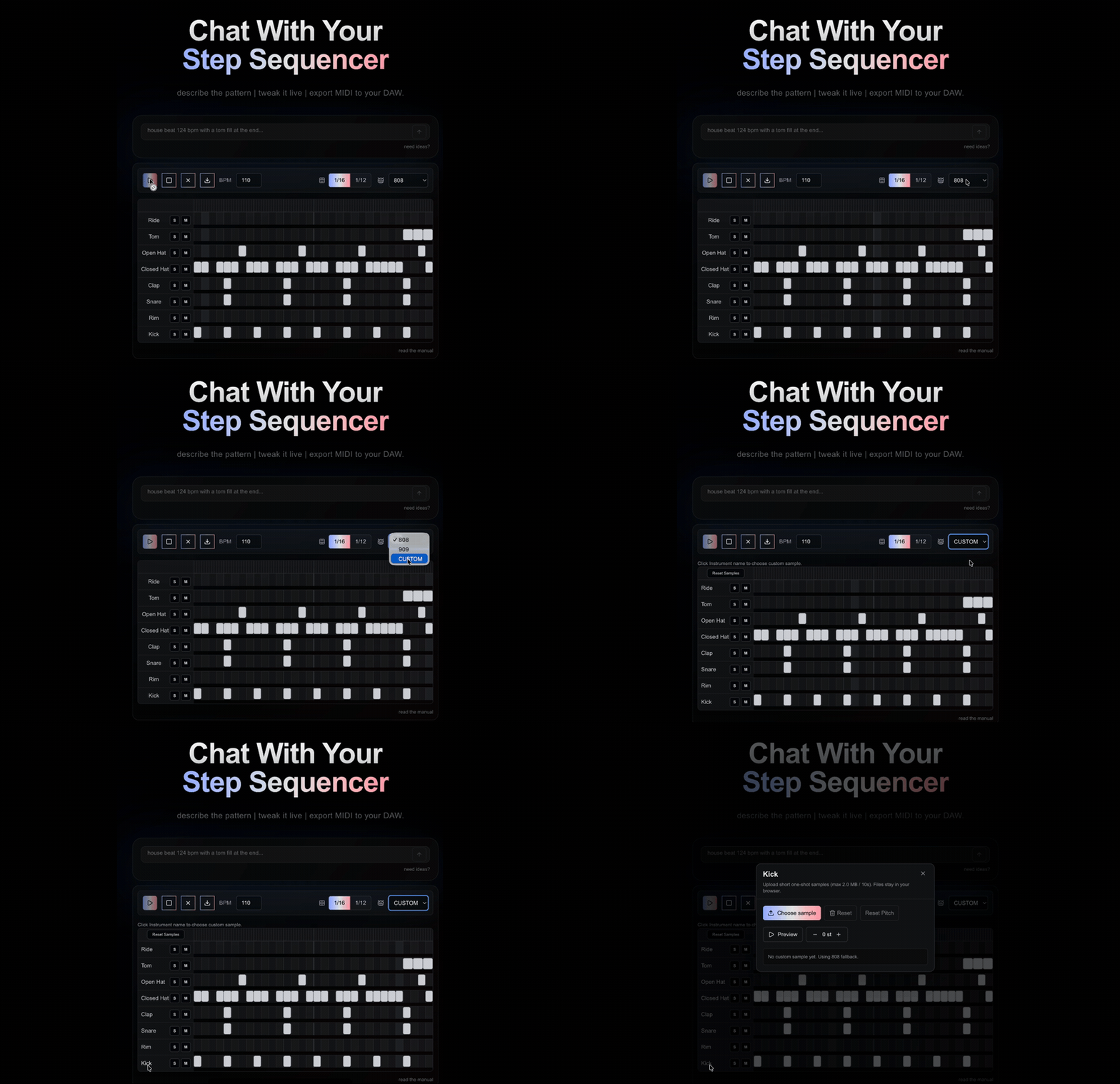 Describe a pattern, tweak it on the grid, pick a kit, export.
Key Features
💬 Describing the beat
- Type a request in plain English and Gemini returns a pattern that loads straight onto the grid
- Edits stack on what's already there — "add a tom fill" changes the tom, not the whole pattern — and each response says what it changed
- Genre-aware: house, Dilla swing, UK garage, samba, and others
- Transport runs through the same box: "play it," "set tempo to 128," "mute the hats"
- Simple, unambiguous commands skip the model and run locally, so they're instant and deterministic
🎛️ The sequencer
- Two-bar grid: 32 steps in sixteenth-note mode, 24 in triplet mode, switchable without losing the pattern, with tuplet support down to quintuplets and septuplets
- Eight lanes — kick, snare, clap, rim, closed hat, open hat, tom, ride — each with solo and mute
- Per-step velocity (0–127), pitch (±12 semitones), and note length
- Free notes sit off the grid for ghost notes, flams, and micro-timing
- Adjustable swing (0–100%), tempo from 60 to 200 BPM, and full undo/redo (⌘Z / ⇧⌘Z)
🥁 Kits and samples
- 808, 909, or a custom kit
- Upload your own one-shots per instrument — they're read and played in the browser, never sent to a server
- Pitch any sample ±12 semitones, with a preview before you commit
- Reset back to the stock kits in one click
📤 Export
- MIDI as a standard .mid, two-bar loop, General MIDI percussion on channel 10 — preserves tempo, timing, velocity, and length
- Full mix as a stereo 16-bit WAV, normalized to −0.1 dBFS
- Stems as one WAV per instrument in a zip
- Audio is rendered offline, so export is faster than real time, and swing and groove come through exactly as you hear them
- Web MIDI out, for sending the pattern to hardware or another instrument live
User Flow
- Describe: type the beat you want, or start from one of the prompt ideas
- Listen: hit play and hear it back at your tempo
- Tweak: toggle steps, change the swing or BPM, solo a lane, ask for an edit
- Personalize: switch kits, or upload and pitch your own samples
- Export: MIDI, a full mix, or stems — then keep going in your DAW
Architecture & Backend
Generating patterns
- The prompt is sent to Gemini 3.5 Flash through a Next.js API route, so the key stays server-side and never reaches the client. The model returns a structured set of operations against a typed pattern schema rather than free text, which is what makes the result land cleanly on the grid.
- Not every request needs the model. A local fast path handles the unambiguous ones — tuplets, transport, plain transforms — without a round trip, which keeps them instant and predictable.
- Generation quality is measured, not eyeballed. There's an evals harness (
Vitestplus scripts) that scores prompts against a dataset and compares models, with seen / held-out tagging so the few-shot examples don't leak into the score.
Audio
- Playback runs on a Web Audio scheduler. Pitch shifting uses SoundTouchJS, and export goes through an offline render so it's faster than real time and matches what you heard.
@tonejs/midiwrites the MIDI file,wavefilehandles the WAV encoding, andfflatezips the stems.
Data & privacy
- There's no account, and patterns and custom samples stay in the browser.
- The only thing stored server-side is the waitlist — email and an optional note — kept in InstantDB, with Resend for email. Nothing about your patterns is logged.
Technical Challenges Overcome
Making the model's output predictable
The hard part of a "describe it" interface is that the model has to produce something the app can use every time, not prose. Having Gemini return operations against a typed schema — and backing that with an evals harness that scores prompts against a dataset — turns "does this prompt work" from a guess into a number.
Knowing when not to call the model
A lot of what users type doesn't need an LLM. Routing the unambiguous commands to a local fast path makes them instant and deterministic, and keeps the model for the requests that actually benefit from it.
Keeping the export honest
The exported file has to match what you heard, including swing and per-step timing. Rendering offline from the same pattern data — rather than re-recording playback — keeps the preview and the file in agreement, and the MIDI maps to General MIDI percussion so it lands on the right drums in any DAW.
Custom samples without a backend
Letting people bring their own sounds usually means uploads and storage. Here the samples are read, pitched, and played entirely in the browser, so there's nothing to upload and nothing to store.
Tech Stack Breakdown
App
- Next.js 15 (App Router, Turbopack), React 19, TypeScript, Tailwind CSS v4
- Web Audio API for playback and an offline render for export
- SoundTouchJS for pitch,
@tonejs/midifor MIDI,wavefilefor WAV,fflatefor the stems zip
Generation
- Gemini 3.5 Flash behind a server-side API route, returning operations against a typed pattern schema
- A local fast path for unambiguous commands
- Vitest plus an evals harness that scores prompts against a dataset and compares models
Backend
- InstantDB for the waitlist, Resend for email — and nothing else server-side
Impact
bootsncats turns "click out every hit" into "say the beat, then fix what's off." It's a normal step sequencer once the pattern is there — the AI just gets you to a starting point faster. Most of the work went into the two things that make that trustworthy: the model returning something the app can always use, and the export matching what you heard.