Project Overview
Speedup is a Mac app for speeding up the slow parts of a long video.
You record something — a coding session, a design timelapse, a makeup tutorial, a music walkthrough, some gameplay — and most of it is dead air. The good moments are there, but they're spread across 30 minutes nobody will sit through. The usual fix is to open iMovie or Premiere and cut and re-speed each section by hand, which takes longer than the recording did. So the video sits on disk instead.
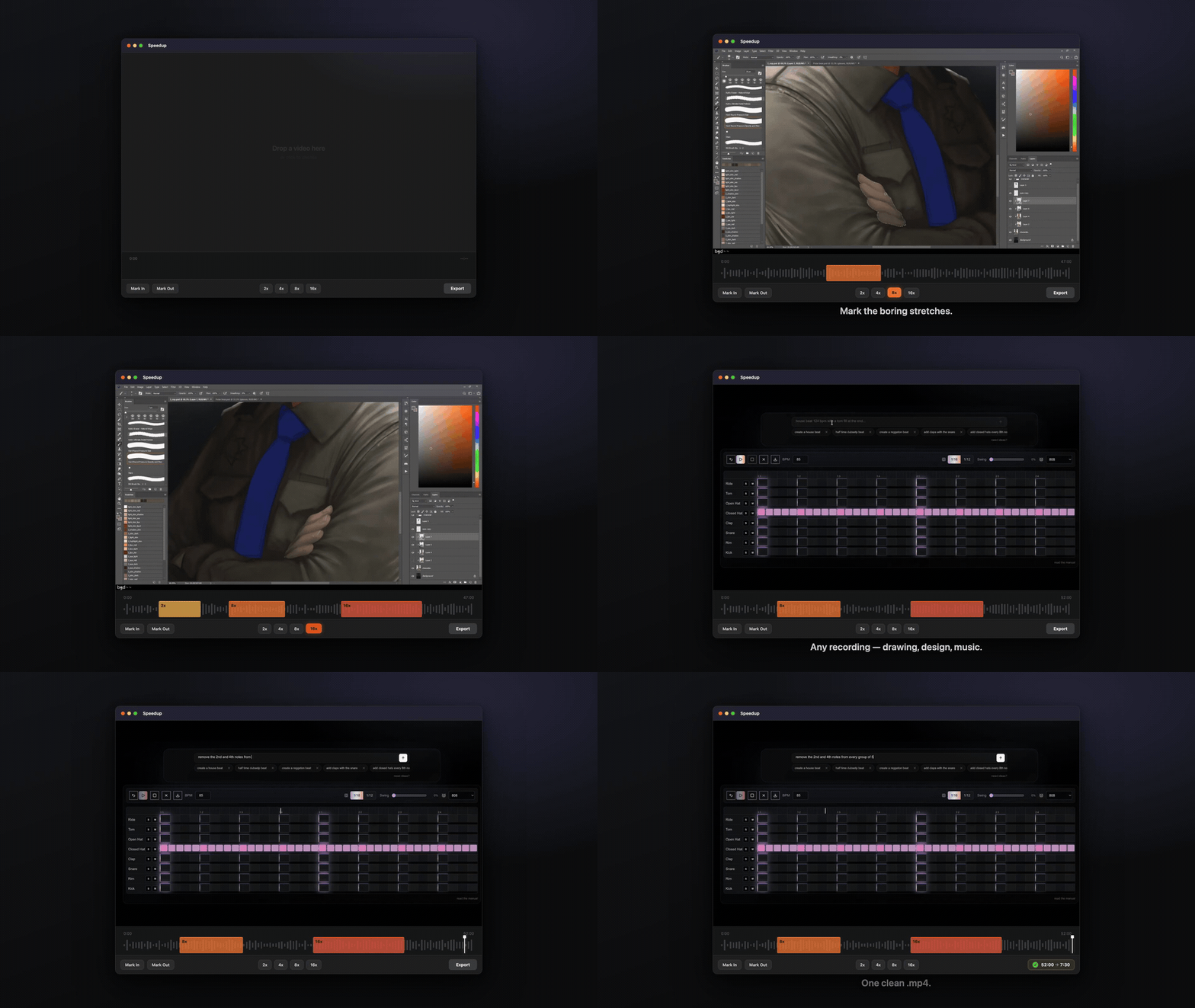
Speedup does that one edit and stops there. You open a video, drag to mark the slow parts, pick a speed for each (2x, 4x, 8x, 16x), trim the start and end, and export an H.264 .mp4 you can upload to YouTube, Instagram, or LinkedIn. It runs locally and ships as a signed, notarized .dmg. The first export is free; after that it's a one-time $29 to keep exporting, with no subscription or account.
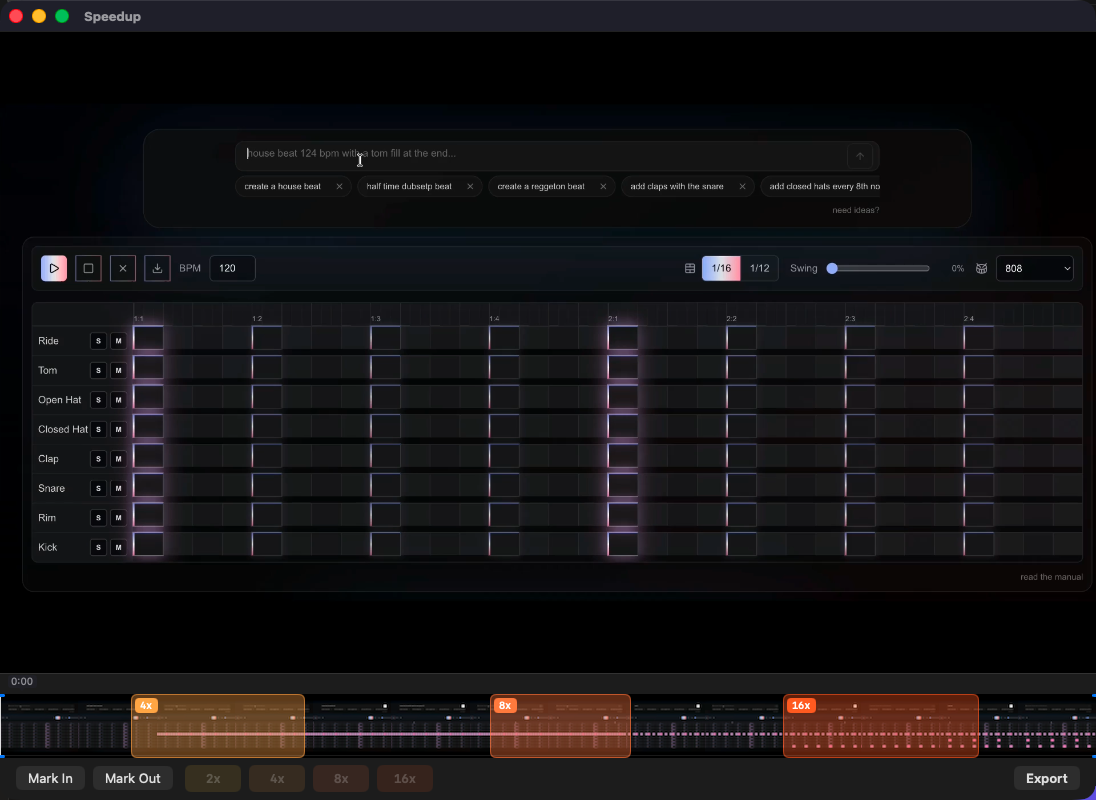 Drag to mark a segment, pick a speed (2x, 8x, 16x), trim the ends, export.
Key Features
⚡ Speed segments
- Set in and out points on the timeline and pick a speed (2x / 4x / 8x / 16x) with one click on a speed chip
- Add as many segments to a video as you want, and edit or delete any of them
- Undo and redo cover every segment and trim operation (⌘Z / ⇧⌘Z)
- Segments are always non-overlapping, sorted, and inside the trim bounds — the data model can't represent an invalid state
🎬 Export
- One export path: H.264 .mp4 at the source resolution. There are no codec, quality, or format options to set
- Audio in sped-up segments is dropped; normal-speed audio plays through as recorded, so nothing drifts out of sync at the speed boundaries
- The progress bar is determinate and the export can be cancelled. The session is saved before every export, so a failed or cancelled export never loses your marks
🗂️ Auto-restore
- The app reopens each video where you left off — segments and trim survive a quit and relaunch
- There are no project files to manage and no save dialog
- If a restore fails, the app just opens a fresh session instead of showing an error
🖥️ Native macOS
- Standard controls, SF Symbols, system materials, light and dark, and the system accent color
- Respects Reduce Motion; animations are short and cheap (opacity and position, 150–300ms)
- The empty state — "Drop a video here" — is the whole onboarding
User Flow
- Open: drag in or pick a video (.mov / .mp4 / .m4v). It loads onto the timeline with a preview player
- Mark: scrub to a slow stretch, set in and out, click a speed chip. Repeat for each one
- Trim: pull in the start and end
- Preview: scrub or play across a speed boundary to check it reads right
- Export: ⌘E to an H.264 .mp4, watch the progress bar, upload it
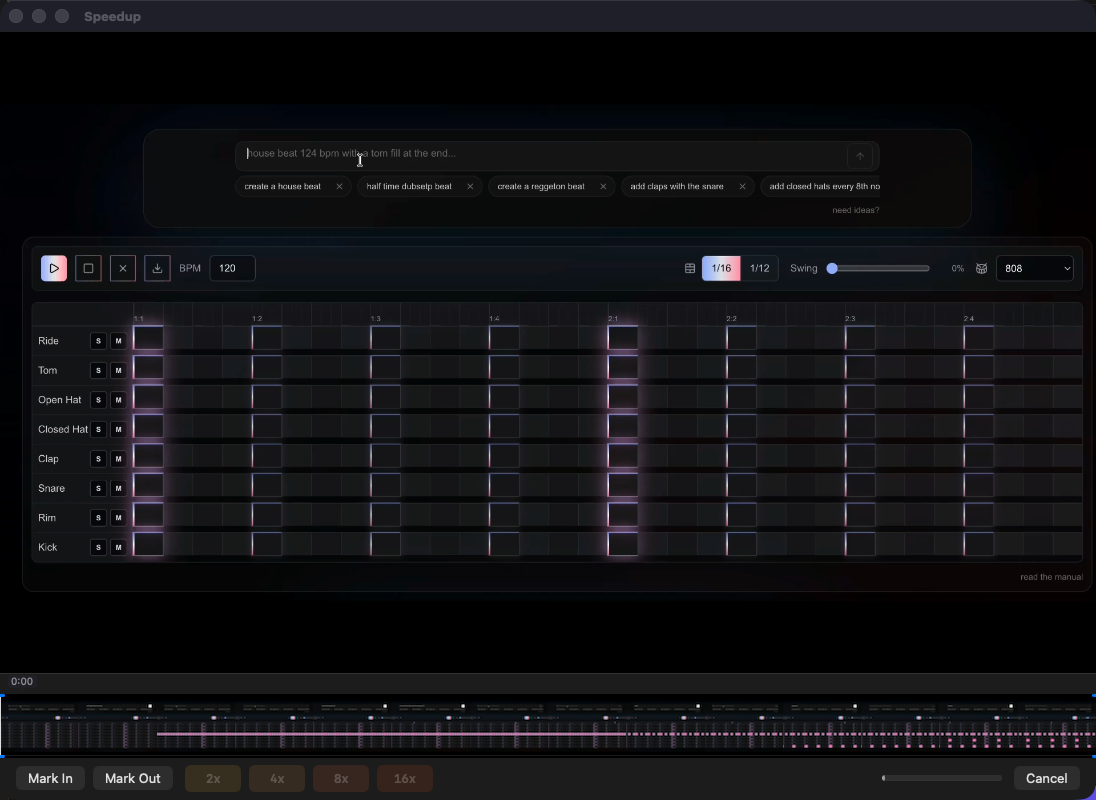 The export is determinate and cancellable, and the session is saved before it starts.
Architecture & Backend
All of the segment, trim, and time-mapping logic lives in a pure-Swift module called SpeedTimeline that imports Foundation and nothing else — no AVFoundation, no SwiftUI. That keeps the time math testable and separate from the media framework.
Domain Layer (SpeedTimeline)
- Value types that enforce their invariants at construction, so there's nothing to validate after the fact
- Times are rational (
value/timescale, likeCMTime) rather thanDoubleseconds. Floating-point drift at the boundaries is what causes glitches in the export, so the math stays in integers - Covered well by Swift Testing: boundaries, adjacent segments, trim edges, output duration, undo round-trips
Media Pipeline
- One
AVMutableComposition, built withscaleTimeRange, drives both the previewAVPlayerand theAVAssetExportSessionexport. There's a single source of truth, so the preview matches the exported file - Sped-up ranges contain no audio track in the composition, which is how the audio gets muted there. There's no
AVAudioMixinvolved - It's built entirely on Apple frameworks, with no third-party packages
Concurrency
- Swift 6 strict concurrency is on. UI state is
@MainActor - The export runs detached, with async progress and cooperative cancellation. No
@unchecked Sendableto get around the compiler
Persistence
- Sessions are versioned JSON files in
~/Library/Application Support/Speedup/, with security-scoped bookmarks and a staleness check. There's no database
Security & Privacy
- The app makes exactly one network call in its whole lifetime: activating your license key, and only when you click Activate. Past that one request nothing touches the network — no telemetry and no update checks.
URLSessionappears in a single file and nowhere else - It works entirely on local files, and there's nothing to log into
- It's distributed as a Developer ID–signed, notarized .dmg (archive → sign →
notarytool submit --wait→ staple → .dmg) so Gatekeeper trusts it on first launch
Technical Challenges Overcome
Keeping exports in sync
The export can't drift out of sync or glitch at a speed boundary. Two things make that work: the time math is done in rational numbers end to end, and the same composition feeds both the preview and the export. That removes the class of bug where the preview and the rendered file disagree.
Keeping the time math isolated
Keeping AVFoundation and SwiftUI out of the time-mapping layer took some discipline, but it's why the segment math can be unit-tested thoroughly, and why boundary glitches get caught in tests instead of in an exported file.
Deciding what to leave out
The harder calls were about scope. Custom speeds, overlays, export options, a settings screen — each one adds a decision the user has to make, so none of them shipped. Keeping the app to single-click actions was the point.
The Website & Licensing
The app has its own site, built with Next.js and deployed on Vercel, which redeploys on every push to main. Alongside the main page there are separate landing pages for specific searches — speeding up coding videos, design timelapses, makeup tutorials, music production, and an iMovie-alternative page — each with its own generated OpenGraph image, plus a sitemap and robots file. The demo videos are made with Remotion rather than screen-recorded, one per use case, and the signed .dmg is served straight from the site.
Pricing is one-time: $29 to keep the app, including a year of updates, with no subscription and no account. The first export is free, with no watermark and no time limit, and exporting again unlocks with the purchase. Checkout runs through Polar, which handles receipts, tax, and refunds, so neither the site nor the app touches payment details.
Buying gives you a license key. You paste it into the app and click Activate, which sends a single POST to Polar's license-key endpoint. That is the only network call the app ever makes. After it succeeds, the entitlement is stored locally and everything works offline from then on, including future exports. Nothing runs in the background to re-check it.
Whether an export is allowed is decided by a small pure function called ExportGate, which looks at the local entitlement and returns one of three answers: the first export is free, a valid license means unlimited exports, and otherwise the app shows an unlock sheet instead of exporting. Keeping that decision pure and Foundation-only is the same rule the time-mapping layer follows, so it gets the same exhaustive unit tests.
Tech Stack Breakdown
App
- Swift 6 with strict concurrency; SwiftUI
Applifecycle - AVFoundation —
AVMutableComposition,scaleTimeRange,AVPlayer,AVAssetExportSession - Pure-Swift
SpeedTimelinedomain layer (Foundation only) - JSON session sidecars with security-scoped bookmarks
Testing & Release
- Swift Testing for the domain layer, plus one fixture-based export integration test
- Developer ID signing,
notarytoolnotarization, and stapling, packaged as a .dmg viascripts/release.sh
Website & Licensing
- Next.js on Vercel (redeploys on push), with per-use-case SEO landing pages, generated OpenGraph images, sitemap, and robots
- Remotion for the rendered demo videos
- Polar for one-time checkout; the app activates a license key against Polar's customer-portal endpoint and stores the entitlement locally
ExportGate— a pure, Foundation-only function that gates exports on the local entitlement (free first export, then licensed)
Impact
Speedup turns "open a real editor and spend longer than the recording took" into "mark, pick a speed, export." It does one thing. It stays small and fast because that's all it tries to do, and most of the work went into making that one edit reliable.